
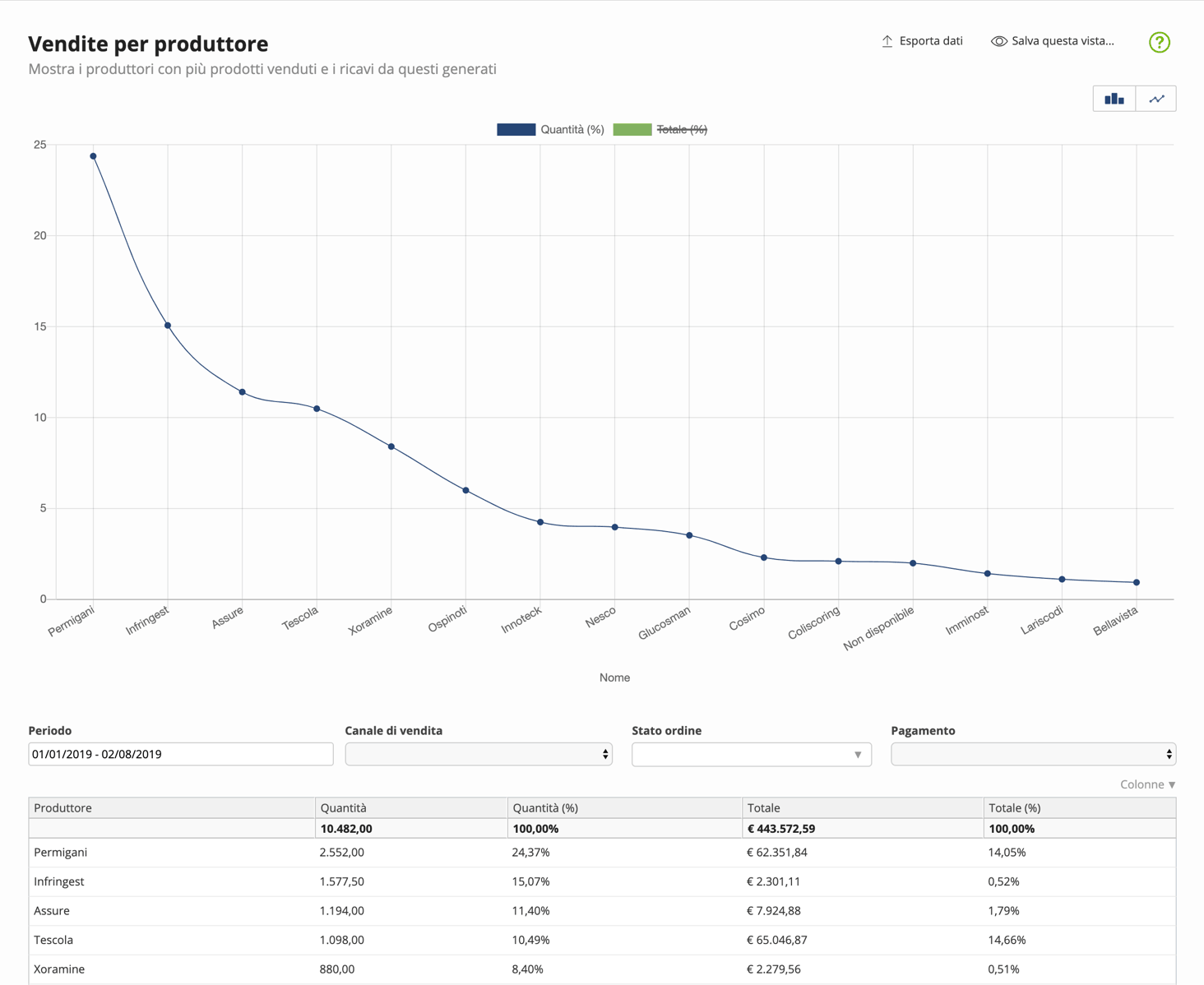
Sales by manufacturer
Shows, for each manufacturer, the total products sold and the revenue generated.
The "manufacturer" field is also used to identify product brands.
You can filter data by
- Period: date range in which you want to narrow or expand the analysis
- Sales channel: website, Amazon, eBay, or other channels
- Order status: the status of the order at the time of analysis, e.g., new, ready, shipped, etc.
- Payment: filters orders paid or to be paid at the time of analysis
Columns
| Column | Description |
|---|---|
| Manufacturer | Manufacturer name. Indicates a specific manufacturer whose products are sold on the site or other channels. |
| Code | Manufacturer code. Identifies a specific manufacturer whose products are sold on the site or other channels. |
| Quantity | Quantity ordered in a given time period, which can also be filtered by channel, order status, and payment status. |
| Quantity (%) | Quantity ordered in a given time period, expressed as a percentage of the total indicated in the Quantity field. |
| Total | Total sales expressed in currency. Amounts are grouped according to the desired criteria, net of direct promotions applied to products and gross of promotions applied to the total order. |
| Total (%) | Total sales expressed as a percentage. Sales are compared to the total indicated in the Total field. |